
How to Use JWT in Node.js Express API with Password Hashing & MongoDB
Saving a password as plain text in your database is one of those things that seems fine until it absolutely isn't. This tutorial walks through building a Node.js Express API that hashes passwords with bcrypt before storing them in MongoDB, and issues JWT tokens for authenticated requests.
Pre-requirements:
- JavaScript and Node.js/Express knowledge
- Node.js installed locally
- MongoDB Atlas free account
- Linux-based OS (macOS works fine)
Step 1: Project Setup
mkdir node-jwt-api && cd node-jwt-api
npm init -y
npm i express cors mongodb bcrypt jsonwebtoken
touch index.js .gitignore .env
Step 2: Configure the API
Here's the full import block and initial server setup:
const express = require('express')
const cors = require('cors')
const bcrypt = require('bcrypt')
const jwt = require('jsonwebtoken')
const { MongoClient } = require('mongodb')
require('dotenv').config()

const app = express()
app.use(cors())
app.use(express.json())

const client = new MongoClient(process.env.MONGO_URI)
let usersCollection

async function connectDB() {
  await client.connect()
  const db = client.db('mydb')
  usersCollection = db.collection('users')
  console.log('Connected to MongoDB')
}

connectDB()

app.listen(4040, () => console.log('API running on PORT 4040'))
Step 3: Environment Setup
Create a .env file and add your MongoDB Atlas connection string:
MONGO_URI='mongodb+srv://YOUR-USERNAME:YOUR-PASSWORD@your-clusterid.mongodb.net/test'
Make sure .env is in your .gitignore — never commit credentials.
Step 4: Routes
Sign Up Route
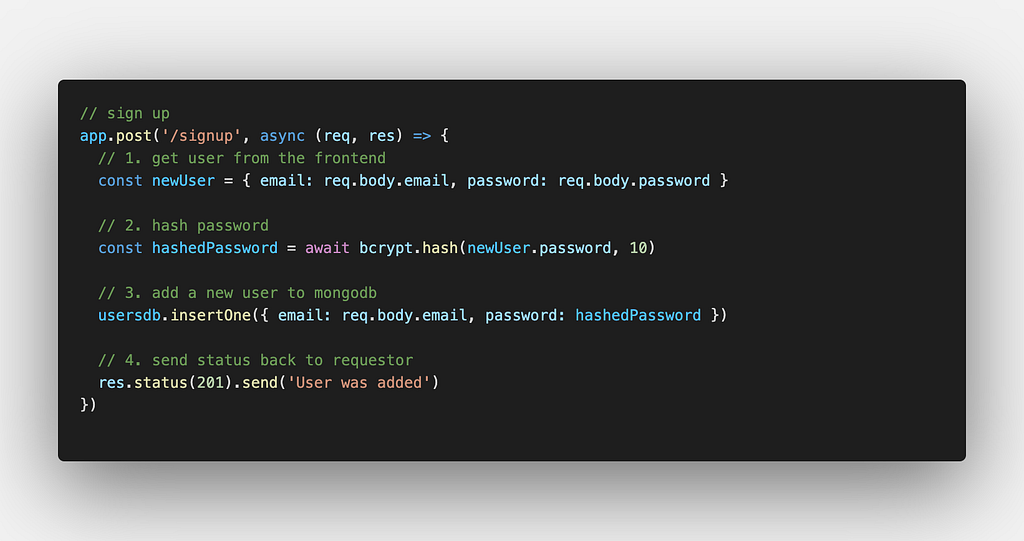
The sign-up endpoint receives an email and password, hashes the password using bcrypt.hash() with a salt rounds value of 10, and stores the user document in MongoDB.
Login Route
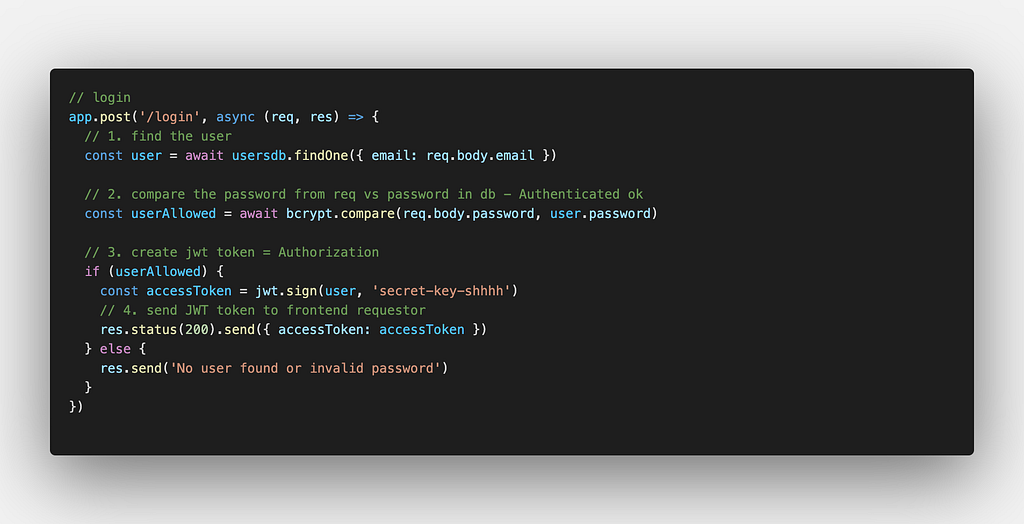
The login endpoint looks up the user by email, runs bcrypt.compare() against the stored hash, and returns a signed JWT if the credentials match.
Get All Users Route
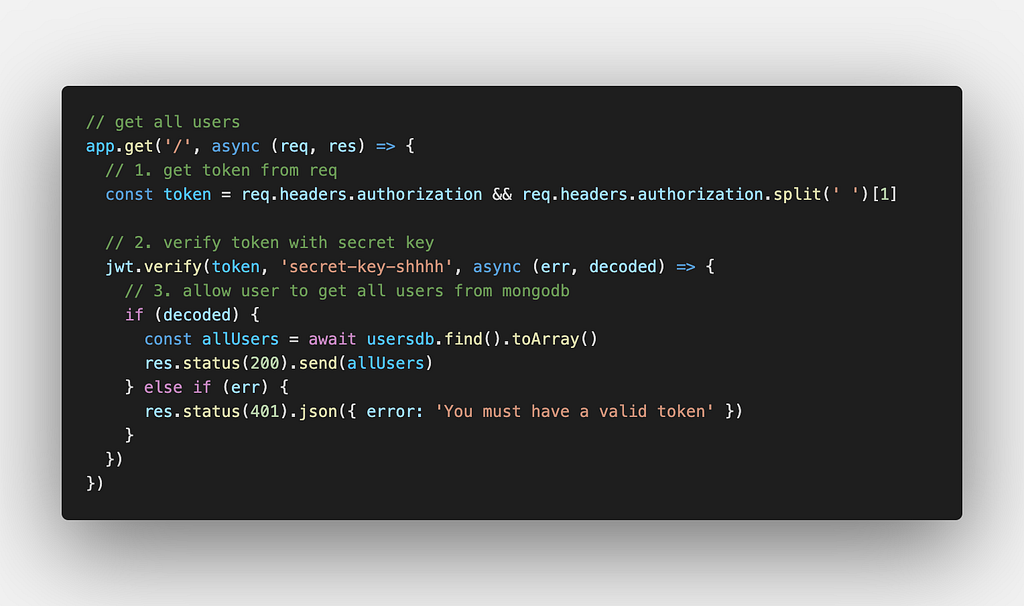
A protected endpoint that retrieves all users from the collection. In production you'd gate this behind JWT middleware.
Full Sample Code
[Full sample code available on Medium]
The complete working implementation — including the JWT secret config, all three routes, and MongoDB connection handling — is available as an embedded gist in the original Medium article.
How It All Fits Together
- User signs up → password is hashed → stored in MongoDB
- User logs in → submitted password is compared against stored hash → JWT is issued
- Client sends JWT in subsequent requests → server verifies the token before responding
This pattern keeps plain-text passwords out of your database entirely. Even if someone dumps your database, they get hashes — not passwords.