
How to Hash Password in React App Before Sending it to the API
Imagine someone using your app on a public WiFi network and a packet sniffer is capturing all HTTP traffic. If your login form is sending the password as plain text — even over HTTPS — you're adding unnecessary risk. Hashing on the client side before the password ever leaves the browser adds another layer of protection.
The Problem
When a React login form sends a password over the wire, the plaintext credential travels from the browser to your API. If HTTPS is your only protection and it gets stripped or intercepted (man-in-the-middle, misconfigured proxy), the raw password is exposed.
The Solution
Hash the password client-side using bcryptjs before it's sent to the API. The API never sees the original password — only the hash. The backend then stores and compares hashes.
Step 1: Create a React Application
If you don't have a project yet:
npx create-react-app bcrypt-react
cd bcrypt-react
yarn start
Step 2: Install bcryptjs
yarn add bcryptjs
Reference: bcryptjs on npm
Step 3: Build the Login Form in App.js

In your login form's submit handler, hash the password before sending it to the API:
import bcrypt from 'bcryptjs'

const handleSubmit = async (e) => {
  e.preventDefault()

  const salt = bcrypt.genSaltSync(10)
  const hashedPassword = bcrypt.hashSync(password, salt)

  const response = await fetch('https://your-api.com/login', {
    method: 'POST',
    headers: { 'Content-Type': 'application/json' },
    body: JSON.stringify({ email, password: hashedPassword }),
  })

  const data = await response.json()
  // handle response...
}
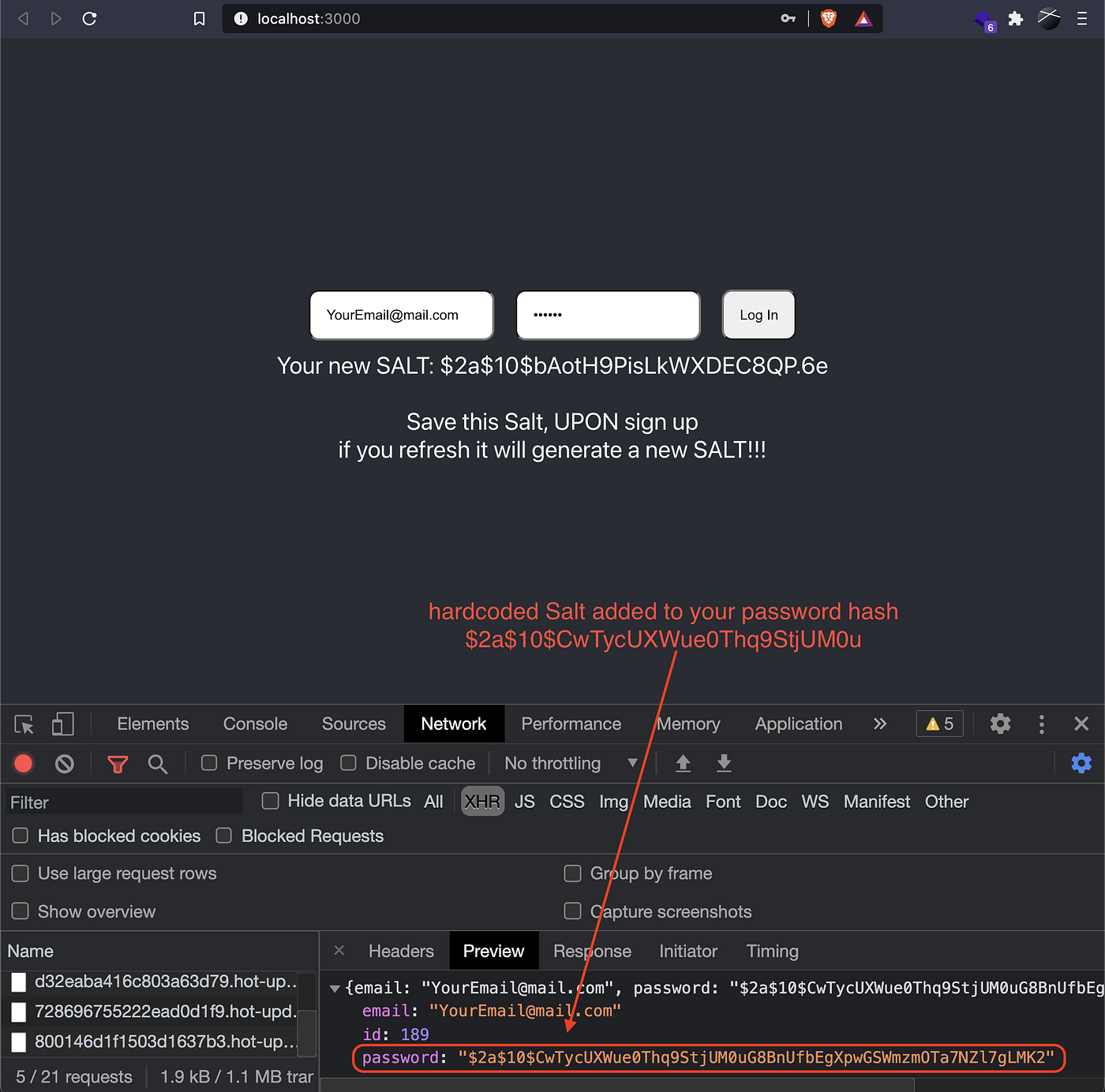
The password is hashed and salted before it ever hits the network. The original string never leaves the browser.
Sample Repository: bcryptjs-react-app
Backend Handling
On the API side, the workflow is straightforward:
- Receive the hashed password from the client
- Store the hash in your database for the user's account (never the original)
- Verify on login by using
bcrypt.compare()against the stored hash - Optional: Generate a JWT after successful verification and return it to the client
// Example login route (Node.js / Express)
app.post('/login', async (req, res) => {
  const { email, password } = req.body
  const user = await usersCollection.findOne({ email })

  if (!user) return res.status(404).json({ error: 'User not found' })

  const isMatch = bcrypt.compareSync(password, user.password)
  if (!isMatch) return res.status(401).json({ error: 'Invalid credentials' })

  const token = jwt.sign({ id: user._id }, process.env.JWT_SECRET)
  res.json({ token })
})
This keeps plaintext passwords completely out of your system — from the client, through the wire, and in the database.